How to use the new Modes
Whether you want to lose weight, maintain your weight loss, or increase your program intensity, it’s easy to choose (and change) Modes in the WW app.
Remember the viral crinkly swimsuit whose makers claimed it would fit anyone? “One size fits all” has never been our thing at Weight Watchers — not for swimwear and not for how to eat. That’s why we have several different Modes in our app, including a brand new one, with options for different stages of your journey.
What are modes?
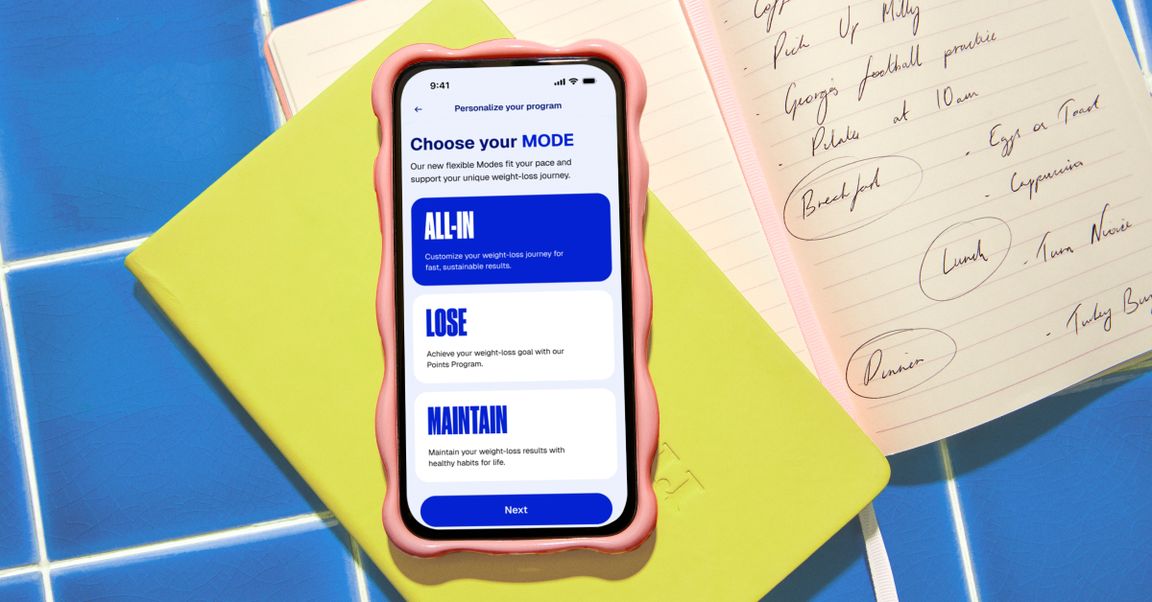
Modes are a new way to adjust your settings to match your schedule, your motivation, and your needs. They’re a system of science-backed settings you can easily toggle between within the Weight Watchers app, delivering a more flexible, more livable, and more realistic approach to weight management. They include Lose Mode, Maintain Mode, and All-In Mode.
Sometimes you may feel a burst of motivation, have more mental or time flexibility, and be ready for a big challenge. Other times, you’re just trying to make it through the day. Since we’re humans, not machines, we have natural rhythms, so it makes sense to follow them.
Unlike lots of weight-loss programs that ignore the ups and downs of the times of year or your stress level and recommend the same robotic program, Modes let you lose weight while rolling with real life.
Lose Mode
This is the default setting you know and love, perfect for when you’re trying to lose weight. You’ll practice creating healthy, sustainable habits using the Weight Watchers Points® program, with a Daily Points Budget that’s tailored specifically to your body and your weight-loss goals. In this setting, you’ll get Weeklies, additional Points you can spend each week after you’ve used all of your Daily Points. (Rest assured that even if you use all of your Weeklies, you should still be seeing weight loss.) You can also add to your Weeklies Budget by logging your workouts, and you can roll over up to 4 unused Daily Points to your Weekly bank if you want to use them for something special, like a glass of wine and a dessert at dinner.
Maintain Mode
Once you’ve hit your weight-loss goal (congrats!), it can be tricky to maintain it. In a meta-analysis of 8 long-term weight-loss maintenance studies, half of the studies resulted in weight regain. Not only does regaining weight you worked so hard to lose feel demoralizing, but “weight cycling” up and down can increase the risk of various diseases, even more so than just having continuous obesity. That said, studies show that getting support — like Weight Watchers offers through coaching and Member communities — can help reduce weight regain. Maintain Mode is similar to Lose Mode in that you’ll still be allotted Weeklies and can earn bonus Points for logging physical activity. The main difference from Lose Mode is that your Daily Points number will increase a bit, since you’re not actively trying to lose weight — but it should help you stay at your current weight, be consistent, stay accountable, and stick with healthy habits for life.
All-In Mode
Our newest mode is for when you want to get results faster and you have the mental and physical bandwidth to tackle a challenge — you guessed it, when you’re ready to go All In. While the other modes are available for all Programs, All In is currently not available for the GLP-1 Success Program or the Diabetes Program.
The biggest difference you’ll see when going from classic Lose Mode to All In is that it doesn’t include any Weeklies. Once you spend your Daily Points, you’re encouraged to utilize healthy ZeroPoint foods if you’re still hungry. This Mode also keeps you moving, recommending at least 150 minutes of physical activity each week. And All-In Mode also provides exclusive access to our new Weight Health Score tool, which gives you a score of 0-100 as a snapshot of your holistic weight health, taking into account nutrition, activity, weight tracking, and sleep.
When should I change my Mode?
We created Modes so your weight journey can keep up with your real life — because a weight loss plan that doesn’t have any flexibility is likely not going to work long-term. That’s why we made it easy to switch Modes. Think about what the next few weeks or months of your life will look like. For example:
You want to ease up — but not gain weight
Is your child’s soccer season about to start, with lots of after-work and weekend games and practices? Is your job ramping up and you’ll be staying at the office later at night or traveling a lot? Will you be relaxing on a beach for a wonderful vacation and don’t want to be as careful about what you’re eating? Are you heading into the holidays and looking forward to cooking and baking your favorites with friends and family? All of these are examples of great times to temporarily switch to Maintain Mode (yes, even if you’re not at your weight-loss goal). You’ll get 6 more Daily Points a day added to your Budget, so you can have a little more ease around what you eat — still without gaining weight.
You’re feeling a burst of motivation
Do you have a big family wedding or a high school reunion coming up in a few weeks or months? Is your schedule or your mental load a little more clear than it has been? Are you committed to increasing the intensity of your weight-loss program? Then toggle on All-In Mode. You can always switch back to classic Lose Mode when you want to take a break.
Where can I change my Mode?
Changing your Mode is simple. Our goal was to make it easy to switch between Modes as your needs change. On your Weight Watchers app Home Screen, tap the Settings wheel in the top right corner. In the Settings menu, navigate to Modes, then Toggle on / off Modes. Return to the Home Screen to see your Points adjustment. When you want to switch again, just navigate back to the same spot.
The bottom line
Whether you want to drop weight (Lose Mode), stay at your current weight and be consistent with lifelong habits (Maintain Mode), or increase your intensity (All-In Mode), it’s easy to choose — and change — Modes in the WW app. Now your tailored recommendations can adapt to the roller coaster of life and flex with you at every point in your journey.