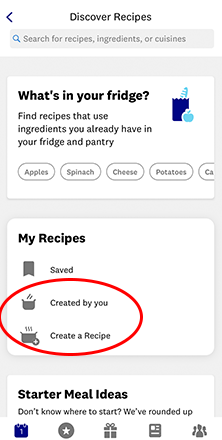
Where to find recipes in your WW app
Our database has more than 6,500 recipes developed by WW nutritionists and chefs! There are a few different ways to find them, so let's walk through the basics.

1. Using the Search Bar
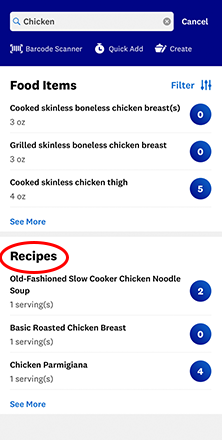
This one's pretty straightforward—simply type an ingredient into the search bar at the top of the app.
Let’s say you're looking for a killer chicken recipe. Simply type chicken into the search bar, then scroll down past the food items to find some suggested recipes.
2. The "What's in your Fridge?" Feature
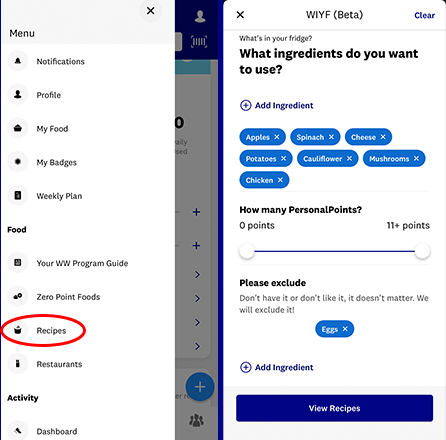
You tell us what you have on hand and our database recommends recipes we think you'll love.
To find it, tap the hamburger menu icon (three horizontal lines) on the top left corner of your app and scroll to the Recipes section. This will take you to the What's In Your Fridge feature.
3. Recommended recipe carousel
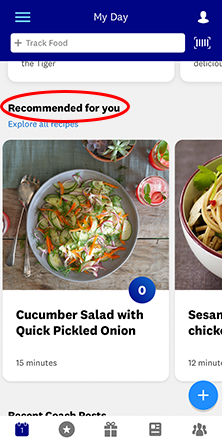
On the homescreen, scroll down until you see the Recommended For You carousel. (You've probably already found this one!)
4. The EXPLORE Section
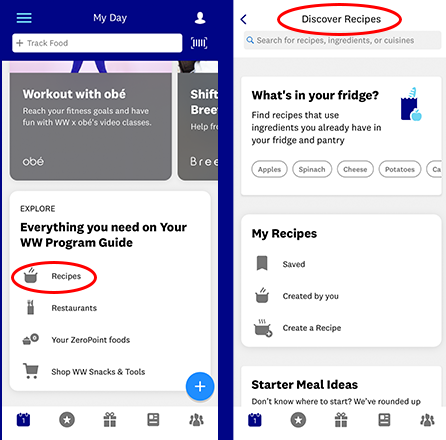
The very bottom of the homescreen is where you'll find shortcuts to major hubs in the app.
How to Build Your Own Recipe Collection
Build a recipe collection by tapping the save button on the recipe card.
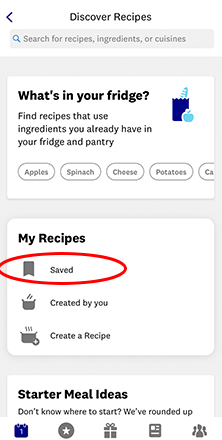
To find your saved recipes, tap the hamburger menu icon (three horizontal lines) on the top left corner of your app and scroll to the Recipes section. This will take you to the Discover Recipes page. Scroll until you see the My Recipes section and look for the Saved icon.
Creating Your Own Recipes
Want to save a recipe that's not in our database (for example, your grandma's lasagna)? Tap the hamburger menu icon on the top left corner of your app and scroll to the Recipes section.