How to use the WW mobile app
Start tracking your way to weight loss success
How to download the app if you have an iPhone or iPad:
1. Go to iTunes App store
2. Search for WW (Weight Watchers)
3. Select 'WW app (Weight Watchers app)'
4. Click download
Click here for iOS
How to download the app if you have an Android device:
1. Go to Google Play
2. Search for WW (Weight Watchers)
3. Select the 'WW app (Weight Watchers app)'
4. Click download
Click here for Android
How to use the app
My Day dashboard
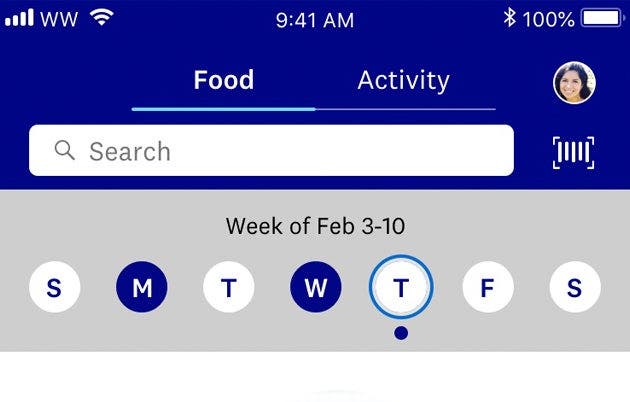
My Day is your home base for tracking. Toggle between Food and Activity using the split screen at the top.
To look up foods, recipes or activities, type a search term into the white search bar, hit 'Search' and browse the list to find the item you're after.
Tap or swipe right to add items items to your My Day dashboard. You'll also find a quick link to the barcode scanner on the right.
Scroll down to discover recipes from Quick & Easy, Family Friendly, and Desserts.
Barcode scanner
We've made tracking as simple as scanning barcodes with your mobile phone.
Click on the barcode icon to the right of the search bar to open up the scanner.
Once you've scanned a food or drink item, you can save it, Favourite it , and track it.
To access your list of scanned foods, click on the barcode and click "Scanned Foods."
Journey
Under the Journey tab you can log your weekly weight and get motivational messages and earn milestone badges.
Flip your phone sideways to view your progress graph which can you filter via 1 month, 6 months, to a year.
You'll also see the weeks you've stayed in the Food Tracking zone (the days you've tracked and stayed within your budget - with a little wriggle room).
Connect
Connect is our social community to hang out with other members. You can share your progress, update your profile and settings and view the updates from other WW Members. This is an exclusive WW Community that's great for making new friends, getting new ideas and sharing motivation. Learn more our about awesome community Connect.
Recipe builder
To create your own recipes, click the orange + button on the home screen and select 'My Foods'.
On the top right, there is a button called 'Create'. You can build in your own recipe, add ingredients, instructions and serving size.
Name your recipe and save it. Click the star to make it a Favourite for next time.
You can also personalise any of our recipes by hitting the top right 'Customise' button.
My foods
To access your created Foods, Recipe and Meals, click the orange + button on the home screen and select 'My Foods'. You can edit items, make them Favourites or delete them.
Online Coaches - here to help when you need it
Whether you need advice, support or technical help, open up a live chat session via the app by clicking on the Chat tab along the bottom if you're using an iPhone, or Click on Profile - Online Coach if you're using an Android phone. You can speak with our team of experts 7 days a week.
Activity
Toggle to the Activity tab to track activity and view your weekly earned FitPoints, minutes of activity, and steps. To track and activity, type in the name into the white search bar. Select it from the list, add your duration, intensity, and time - done!
Connect your activity tracker
If you have an Apple Watch, wireless scales, an activity tracker or Apple Health, you can connect them to your WW account.
To connect your wireless scales, fitbit, Health app or activity tracker, click the top right bar with the the avatar, then the top right settings icon.
Under Activity Settings, select Device, and choose which device you want to connect to.
You can only connect to one activity tracking device at a time.
Tracking button (+)
The orange + button is your shortcut to Favourites, My Foods, Activities, Weight Tracker, and Quick Add/ Calculator. You can search for foods, meals and recipes by typing a key word in the search bar.
Got questions? Need help? Don't be shy! We're here for you. Get support and help from our online coaches, 7 days a week. If you have a question about the programme or need some technical advice, open a chat session under My Day.