How to swap ingredients in a WW recipe
Learn how to tweak a recipe so it perfectly suits your dietary preferences and requirements.

Have you ever spotted a delicious looking recipe in the app - but it uses an ingredient you're not particularly keen on, or you'd like to add a couple of your own?
The app lets you edit recipes, which gives you the flexibility to remove and add ingredients as you please. When you make changes, the Points® value will instantly be recalculated for you!
How to add and delete ingredients
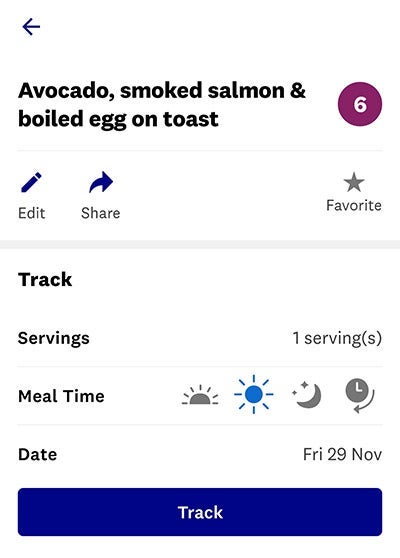
1) Tap 'Recipes' on your My Day screen and find a recipe you want to use. Click 'Edit'.

2) Scroll down to Ingredients. To remove an ingredient, tap and hold until a notification pops up. Click 'delete' to confirm.
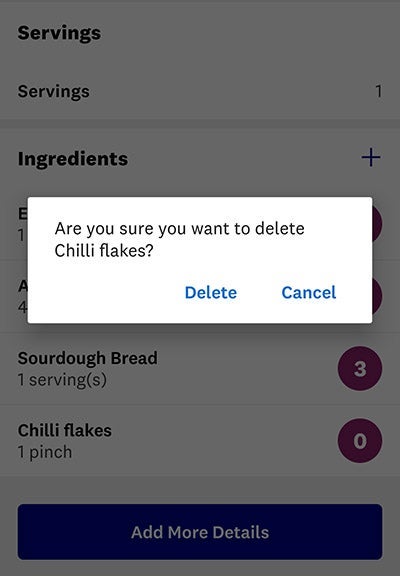
3) To add an ingredient, tap the plus button, search for the ingredient you want and confirm to add. You can also edit the recipe name to reflect your changes.
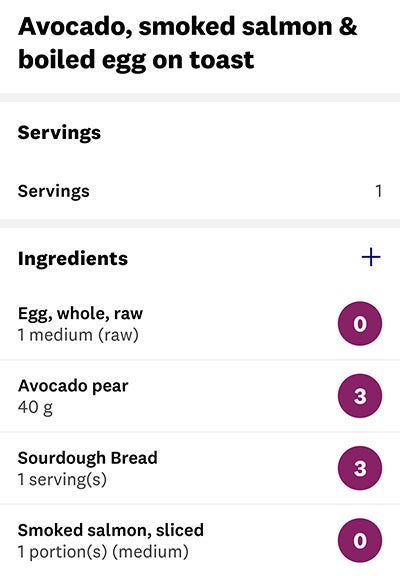
4) Tap the tick at the top of the screen, on the right-hand side, to confirm your changes, and track. The new Points value will be calculated automatically. If this is a dish you want to enjoy regularly, tap the star to add it to Favourites. You can find your Favourite recipes by tapping 'Recipes' on your My Day screen, then tapping 'Favourite recipes'.